

Research Dossier for Target Company: Complete Guide, Template and Sources
A research dossier for target company decisions is one organized file that collects verified facts about a single business before a choice about that business. Every fact in the file carries a source and a check date, so a reader can trust the file or trace any claim back to its origin. Sales teams use dossiers before key pitches, investors use them before deals, and job seekers use them before interviews. The structure stays the same across those uses, while the depth of each section changes with the decision at hand. The guide covers the 12 sections every dossier needs, the best sources for company research, and a step-by-step build process. A free template and a worked example built from a real filing round out the file.
What Is a Research Dossier for a Target Company?
A research dossier is a structured report that gathers verified information about one organization to support a business decision. The target is the company under review, whether a sales prospect, an investment candidate, a supplier, a partner, or a future employer. A dossier turns scattered facts from filings, news, job posts, and reviews into one file. A team can read that file, check every claim, and reuse it for the next decision. Each section answers a fixed question, so two dossiers on two companies can sit side by side and still compare cleanly.
A dossier differs from the two documents people often confuse it with. A company profile gives a quick overview, while a due diligence report verifies legal and financial details before a deal closes. A dossier sits between those two: deeper than a profile, lighter than full due diligence, and always tied to one decision. A business research dossier is the same idea, written for a work decision rather than a general overview.
Document | Purpose | Depth | Typical length |
Company profile | A quick overview of who the company is | One page of basics | 1 page |
Research dossier | Preparation for a specific decision or meeting | Several pages, every fact sourced | 5 to 20 pages, as a rule of thumb |
Due diligence report | Verification of legal and financial details before a deal | Deep, often prepared with advisors | 20 pages or more |
A profile lists facts, while a dossier adds analysis, context, and judgment to those facts. A profile might note that a firm was founded in 2009 and employs 400 people. A dossier adds that the firm depends on two large retail clients, opened three new warehouses, and faces rising fuel costs. The extra layer turns research into a decision document.
When Do You Need One?
A dossier earns its effort whenever a decision about another company carries real money, time, or reputation. Sales teams build one before pitching a key account. Investors build one before backing a company, and buyers build one before an acquisition. Procurement teams build one before signing a long-term supplier. Job seekers build one before an interview with a specific employer. The purpose decides which sections matter most and how deep each one needs to go.
Use case | Who uses it | What the dossier settles |
Sales and account planning | Sales and account executives | Buying committee, buyer needs, account plan |
Investment and due diligence | Investors and analysts | Financial health, ownership, funding, risk |
Partnership and vendor evaluation | Business development and procurement | Strategic fit, vendor risk, long-term stability |
Competitive analysis | Strategy and competitive intelligence teams | Market position and go-to-market differences |
Job interviews | Candidates | Products, culture, leadership, recent news |
Academic research | Students and researchers | Structured company study with sources |
A dossier for a sales call reads differently from one for an acquisition. The sales version leads with decision makers, pain points, and recent triggers. The investment version leads with financials, ownership, and downside risk. The vendor version leads with stability, compliance, and support quality. One template serves all of these jobs, while the reader’s goal sets the reading order.
Start With the Decision, Not the Data

Target company research goes wrong when collection starts before the goal is clear. A team that gathers everything about a company ends with a long file and no answer. A team that starts with one sentence about the decision ends with a short file that answers it. Write the goal first, then let the goal choose the sections, the sources, and the depth.
A useful objective fits one sentence, naming the decision, the reader, and the deadline. Example one: decide whether we start a vendor trial with this supplier by 30 June, for the procurement lead. Example two: assess whether this startup is a sound acquisition target, for the investment committee, before the board meeting. Each version changes what matters, since the vendor version needs stability and compliance. The acquisition version needs financials, ownership, and legal history instead.
Record three facts alongside the objective: the goal, the deadline, and the reader. Those three lines keep the project focused when new information arrives. A fact that does not serve the goal stays out of the file or moves to an appendix. A dossier that tries to answer every question answers none of them well.
The 12 Sections Every Dossier Needs
A complete research dossier for target company research has 12 sections. The list below covers what most readers need, while the priority matrix shows which sections matter most for each goal. Keep the same structure for every company so dossiers stay easy to compare and share. Drop a section only when it clearly serves no purpose for the decision at hand.
Section | Sales | Investment | Partnership | Vendor | Job interview |
1. Executive summary | Essential | Essential | Essential | Essential | Essential |
2. Company overview | Essential | Essential | Essential | Essential | Essential |
3. Products and pricing | Essential | Useful | Essential | Essential | Essential |
4. Leadership and ownership | Essential | Essential | Essential | Useful | Essential |
5. Financial health | Useful | Essential | Essential | Essential | Useful |
6. Market and competitors | Essential | Essential | Essential | Useful | Useful |
7. Customers and positioning | Essential | Useful | Essential | Useful | Useful |
8. Technology and hiring signals | Useful | Useful | Useful | Essential | Useful |
9. Legal and intellectual property | Useful | Essential | Essential | Essential | Optional |
10. Recent news and signals | Essential | Essential | Essential | Essential | Essential |
11. Risks and SWOT | Useful | Essential | Essential | Essential | Useful |
12. Source log and information gaps | Useful | Essential | Useful | Useful | Useful |
1. Executive Summary
Write the executive summary last and place it first. Busy readers often stop after page one, so the summary must carry the whole decision on its own. Cover what the company does, its main products, its market position, the major financial findings, the top risks, and one recommended next step. Keep it to one page and separate confirmed evidence from interpretation. A reader who reads only this page should still know what to do next.
2. Company Overview
Record the legal name, founding year, headquarters, entity type, size, and a one-line description of what the company does. Confirm the legal name and status in the state business registry before collecting anything else. Company websites sometimes use marketing names that differ from official records, and two firms can share a similar name. A short company profile here stops name mix-ups later and anchors every section that follows. Record the founding year and two or three dates that changed the company, such as a pivot, a major acquisition, or a leadership change.
3. Products and Pricing
List what the company sells, who buys it, and how it charges. Note the pricing model, whether subscription, one-time purchase, usage-based, or enterprise contract, and record the date each price was seen. Pricing pages change often, so a price without a date misleads the next reader. Flag which products drive most revenue and which ones face the strongest competition. Product lifecycle management shapes how long each offer stays relevant, so note where each main product sits in its life.
Add one paragraph on the business model: what the company sells, who pays, how often they pay, and how the company keeps the customer. A subscription model brings steady revenue, while one-time sales need constant new buyers. Note the revenue mix across segments, since one segment may carry the whole business.
4. Leadership and Ownership
Name the executives, board members, founders, and major investors. Record the role and tenure of each person listed. Note recent exits, since frequent executive departures can signal trouble. Show the ownership structure: founders, investors, a parent company, or public shareholders. For public companies, ownership and leadership details appear in regulatory filings. For private companies, ownership may be harder to verify, so say plainly when a claim stays unconfirmed.
5. Financial Health
For public companies, pull revenue, profit, debt, and cash flow from SEC filings. For private companies, use funding announcements, hiring trends, and figures the company has published itself. Label every estimate clearly so the reader knows the confidence level. Always attach a date or reporting period to every figure, since revenue without a period means little. Watch the trend, not one year: growing revenue with shrinking cash flow tells a different story than steady growth. KPI examples help here, since the right metrics differ by industry and business model.
6. Market and Competitors
Describe the market, its size, and its growth direction, with one source for each size figure. List three to five direct rivals, with one line each on competitive positioning. Add indirect competitors and substitutes, since a different approach can solve the same customer problem. Say where the target wins and where it trails. Tie the analysis back to the decision the dossier supports. Market growth means more when the target grows faster than its market, and less when rivals grow faster still.
7. Customers and Positioning
Note major customers, case studies, target industries, and the core message the company repeats. Pay attention to concentration: one client delivering half the revenue is a risk worth flagging. Record customer segments by industry, company size, and region, plus the typical buyer role. A clear value proposition shows in what customers repeat back, so compare the company’s own message with what reviews and case studies actually say.
8. Technology and Hiring Signals
Capture the tools and systems the company uses every day. Record its locations and patents in the same section. Job postings often reveal the tech stack and growth areas before any announcement does. Count open roles by team and location: a run of sales hires can point to a push for new customers, while a hiring freeze can signal trouble. Treat hiring signals as hints, not proof, and label them that way. A sudden surge in engineering roles may signal a new product, while layoffs in one department may signal a shift in strategy.
Record headcount, locations, and how the company organizes its work. A company with 50 people in one office runs differently from one with 50 people across five countries. Note which functions sit in-house and which run through contractors or partners.
9. Legal and Intellectual Property
Search for lawsuits, bankruptcies, regulatory actions, trademarks, and patents. A single court record can change how a team approaches a company. Be precise with legal language: “named in a lawsuit” differs from “found liable,” and an allegation does not establish wrongdoing. Check trademark records for the company’s brands and patent filings for its technical direction. A filing does not mean a product exists, so use patents to read direction, not to claim products. Never publish an unverified allegation, since a false claim in a shared file can expose the writer to a defamation claim.
10. Recent News and Signals
Cover the last 12 months of news in this section. Record the date, the outlet, and a link for each item. Look for funding rounds, leadership changes, product launches, layoffs, expansions, and press coverage. Skip rumors and unnamed sources, since unverified news weakens the whole file. Add one line per item explaining why it matters for the decision. Recent signals often give the best reason to reach out, since a funding round or a leadership change opens a window that older facts cannot.
11. Risks and SWOT
Group risks into legal, financial, operational, and reputation buckets, with one example each. Add customer concentration, key-person dependence, and cybersecurity to the list where they apply. A SWOT analysis then turns the evidence from the earlier sections into four boxes, with each point tied to a fact already recorded. Strengths and weaknesses belong inside the company, not outside it. Opportunities and threats come from outside, so the analysis stays honest. A strength needs evidence behind it, and a threat needs a named source, or neither belongs in the file.
12. Source Log and Information Gaps
End the research sections with a log of every source and a list of what could not be found. Label each claim in the file as confirmed, reported, or unverified. Confirmed means a strong primary source backs the claim. Reported means a credible third party published it without independent confirmation. Unverified means no sufficient evidence exists for the claim. Missing information is itself a finding, so record what was checked and what should be checked next. Never fill a gap with an invented number or an assumption.
Best Sources for Company Research
Good company research sources share two traits: they are close to the fact, and they can be checked again later. Sources fall into three tiers, and the tier decides how much weight a claim carries. Start with official records, then add company materials and reputable news. Treat reviews and social media as leads to verify. When two sources disagree, the higher tier wins the argument. Tell the reader which tier each key fact came from, so the file shows its own reliability. Knowing how to verify company information matters more than collecting it, since an unchecked fact is worse than a missing one.
Reliability tier | Sources | Best for | Cost |
Tier 1: official records | SEC EDGAR, state registries, Companies House, USPTO, PACER, court records | Financials, legal status, IP, lawsuits | Free, except PACER at $0.10 per page |
Tier 2: company and news | Company website, investor relations, reputable news, industry publications, job postings | Products, news, hiring signals, market context | Free |
Tier 3: public opinion | Review sites, forums, social media | Sentiment and leads to verify | Free, treat as leads only |
SEC EDGAR is the first stop for any public company. SEC EDGAR company research starts with a name or ticker search. SEC EDGAR offers free public access to millions of filings. No account or registration is needed to search the database. Its full-text search covers electronic filings submitted since 2001, more than 20 years of 10-K annual reports, 10-Q quarterly reports, 8-K event reports, and proxy statements. Search by company name or ticker, then filter by form type and date.
For legal history, PACER opens federal court records across the United States. Access costs $0.10 per page, with a $3.00 cap per document, and fees are waived when total charges stay at $30 or less in a quarter. PACER itself notes that 75 percent of its users pay no fee in a given quarter. Court opinions are always free, while the cap does not apply to transcripts or name searches.
For UK companies, Companies House runs a free search service with no account needed. The register holds records on more than 5.44 million active companies, and annual accounts are free to download. One limit matters: the register is self-reported, and Companies House does not verify the accuracy of filed information. A detail on the public record is not proof on its own, so cross-check important claims elsewhere.
Free Sources vs Paid Databases
Free sources cover most dossiers, since filings, registries, and news are public. Paid databases help when the target is private and filings are thin. Crunchbase tracks funding rounds and investors for private companies. PitchBook covers private market data in much more depth. LinkedIn Sales Navigator maps decision makers and hiring activity. Check current pricing on each vendor’s site before buying, since plans and prices change often. A paid database never replaces the free official record: it adds context around facts that filings alone cannot show.
How to Build a Target Company Dossier
Building a research dossier for target company decisions follows the same order every time. The section explains how to build a company dossier from a blank page. The steps also show how to research a company without missing the facts that matter. The order keeps research consistent and makes gaps easy to spot. Work through the steps below in the order given. Record the source and date of every fact as you go.
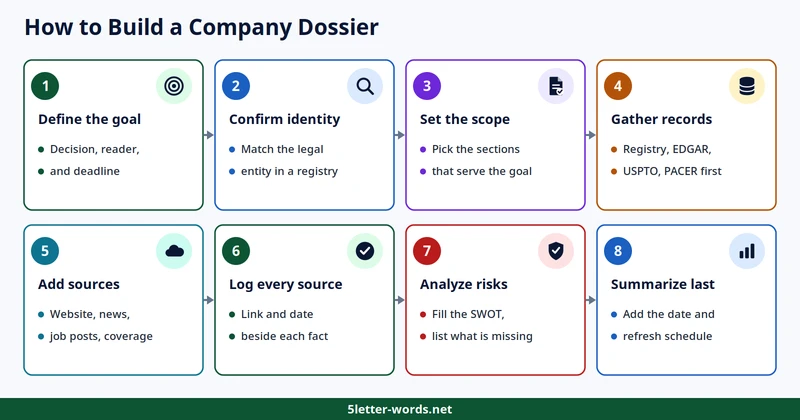
- Define the goal in one sentence, with the decision, the reader, and the deadline.
- Confirm the company identity in a business registry, so the file covers the right legal entity.
- Set the scope by choosing which of the 12 sections matter most for the goal.
- Gather official records first, starting with the state registry, SEC EDGAR, USPTO, and PACER.
- Add company sources and news coverage to the file. Include the website, press releases, job postings, and recent coverage.
- Log every source next to each fact, with the link and the date it was checked.
- Analyze the risks and opportunities in the evidence collected. Fill the SWOT, and list what could not be confirmed.
- Summarize the findings last, after the evidence is complete. Add the report date and version, then set a refresh schedule.
How Long Does a Dossier Take?
Time follows depth, and the goal sets the depth. A quick dossier suits a sales call, a standard one suits a partnership or vendor decision, and a deep one suits an investment or acquisition screen. The times below are typical ranges for one researcher, not guarantees.
Depth | Typical time | Coverage | Best for |
Quick | 1 to 2 hours | 5 core sections, public sources only | A sales call or first meeting |
Standard | Half a day to 1 day | All 12 sections, official records first | A partnership or vendor decision |
Deep | 2 to 3 days | All sections plus legal and IP checks, two-source verification | An investment or acquisition screen |
Free Template
Copy the structure below into Word, Google Docs, Notion, or a spreadsheet, then fill each row with facts, sources, and dates. The company research dossier template covers all 12 sections in fillable form. Treat the dossier as a document, not a pile of notes. Technical documentation habits apply here too: clear headings, dated facts, and a source for every claim. Keep the same layout for every company so dossiers stay easy to compare.
Field | Information |
Target company | Legal name and website |
Prepared by | Name and team |
Prepared for | Client, department, or project |
Purpose | The decision this dossier supports |
Date last checked | When the facts were last verified |
Confidence level | High, medium, or low, based on source quality |
Section | Questions to answer | Main sources |
1. Executive summary | What matters most, and what should happen next? | All sections below |
2. Company overview | Legal name, founded, HQ, size, industry? | State registry, website |
3. Products and pricing | What does it sell, to whom, at what price? | Website, pricing pages |
4. Leadership and ownership | Who decides, and what is their background? | Website, SEC filings, news |
5. Financial health | Revenue, profit, debt, funding, growth trend? | SEC EDGAR, funding announcements |
6. Market and competitors | Who does it compete with, and how does it differ? | News, company materials |
7. Customers and positioning | Key customers, segments, core message? | Case studies, website |
8. Technology and hiring signals | Tools, patents, hiring trends? | Job postings, USPTO, website |
9. Legal and intellectual property | Lawsuits, bankruptcies, trademarks? | PACER, USPTO, court records |
10. Recent news and signals | What changed in the last 12 months? | News outlets, press releases |
11. Risks and SWOT | What could go wrong, and where is the opportunity? | Your analysis |
12. Source log and information gaps | What is verified, and what is still missing? | Evidence log |
Claim | Source | Publisher | Published | Accessed | Status |
[Claim] | [Direct URL] | [Publisher] | [Date] | [Date] | Confirmed |
[Claim] | [Direct URL] | [Publisher] | [Date] | [Date] | Reported |
[Claim] | [Direct URL] | [Publisher] | [Date] | [Date] | Unverified |
Use the same three status labels everywhere in the file. Confirmed means a strong primary source backs the claim. Reported means a credible third party published it without independent confirmation. Unverified means no sufficient evidence exists for the claim. A file that labels its uncertainty earns more trust than one that hides it.
Worked Example: A Mini Dossier for a Real Company (FY2025 10-K)
A filled example shows how the template works in practice. The mini dossier below covers Microsoft Corporation, with every figure drawn from its fiscal 2025 10-K, filed 30 July 2025, and checked against Microsoft investor relations. The example is a snapshot for illustration, not investment advice.
Field | Finding | Source |
Legal name | Microsoft Corporation | FY2025 10-K |
Headquarters | One Microsoft Way, Redmond, Washington | FY2025 10-K |
Chief executive | Satya Nadella, Chairman and CEO | FY2025 10-K |
Employees | About 228,000 full-time, as of 30 June 2025 | FY2025 10-K |
Status | Public, NASDAQ: MSFT | FY2025 10-K |
Fiscal year | Ends 30 June | FY2025 10-K |
Revenue, FY2025 | $281.7 billion, up 15% | FY2025 10-K |
Operating income, FY2025 | $128.5 billion, up 17% | FY2025 10-K |
Net income, FY2025 | $101.8 billion, up 16% | FY2025 10-K |
Microsoft Cloud revenue | $168.9 billion, up 23% | FY2025 10-K |
Main disclosed risk | IRS seeking $28.9 billion plus penalties and interest, tax years 2004 to 2013 | FY2025 10-K |
Filing checked | 10-K filed 30 July 2025 | SEC EDGAR |
The snapshot shows a healthy business with cloud growth driving the year, plus one large disclosed tax dispute that any deeper file must track. A full dossier would add market share, rivals, leadership depth, hiring signals, and recent news to this base. The next step before any investment decision is to read the risk factors section of the same 10-K, since the filing itself lists the risks management sees.
Using AI to Build a Dossier
AI research tools collect and summarize company information in minutes. They draft sections fast, surface leads a person might miss, and keep the same structure across every company. They also invent dates, cite pages that do not exist, and hand over polished reports that cannot be trusted without checks. Use AI for first drafts and summaries, ask it to list its sources, then open those sources yourself.
A 2026 benchmark measured how far AI reports still trail human analysts. Deep FinResearch Bench, published by JPMorganChase AI Research in April 2026, compared agent reports with professional ones. The study used 100 professional pre-earnings reports on 25 S&P 500 companies. On a four-point quality scale, analysts averaged 2.84 while the best agent, Gemini, averaged 2.31. Claim checks varied much more from one agent to another. The share of claims backed by their cited source ran from 86.0 percent for OpenAI’s agent to 53.2 percent for Grok’s. Roughly 10 to 20 percent of agent claims could not be confirmed from their citations at all. Hallucination rates ran from 11.2 percent for OpenAI to 34.1 percent for Grok. Citations from trusted sources told the same story: 88.21 percent of OpenAI’s citations came from high-trust sources, against 54.81 percent for Grok. Forecasts showed the same gap: analysts missed by 17.1 percent on average, while agents missed by 17.5 to 27.6 percent. Agent reports lacked sector-specific metrics, clear reasons for assumptions, and scenario analysis. The study covered equity research on public companies, and the agents were the versions available when the reports were run.
OpenAI launched deep research on 2 February 2025, and its own launch material lists the same limits plainly. The feature can hallucinate facts, make wrong inferences, struggle to tell authoritative sources from rumors, and stay poorly calibrated about its own uncertainty. A link beside a number proves nothing until it is opened, since a citation can point to a page that never contained the claim.
AI Tools for Company Research
AI company research tools fall into five groups, and the right group depends on the job. Pick the tool by the job, not by the brand name. Check each vendor’s current features and pricing before buying. Tools in this space change often, so confirm details on the vendor’s own site.
Tool group | Examples | Best for | Check before buying |
Deep research assistants | ChatGPT Deep Research, Gemini Deep Research, Perplexity Deep Research | Cited drafts in minutes | Hallucination rate and citation quality |
Web research APIs | Tavily, Firecrawl, Parallel | Feeding your own workflow | Citation format and source control |
Company discovery | Exa Websets | Building target lists | Filters and export options |
Sales account research | Clay, Relevance AI | Account records for sales teams | CRM connection and data fields |
Financial research | Hebbia, AlphaSense, Rogo | Filings, transcripts, market data | Source coverage and data privacy terms |
Web research automation | Nimble, Browser Use, Gumloop | Bulk collection | Check data quality and site terms |
A Copy-Paste Prompt for Your First Dossier
Save the prompt below as a company dossier template and swap the bracketed details for the target company. The prompt works in most deep research tools today.
You are a research analyst. Build a research dossier for [company name] at [website] in [country]. The goal is [decision], the reader is [role], and the deadline is [date]. Use sources in this order: filings and business registries, company investor relations pages, reputable news, company website, job postings, then reviews and forums. Write each section in short, plain sentences: company snapshot; business model; market and competitors; leadership and ownership; financials or funding; products and technology; hiring and growth signals; recent news; risks and red flags; summary and recommended next steps. Put a source link after every fact, number, and date. State the date of each source. Mark any claim with no source as UNVERIFIED. When sources conflict, show both. List what you could not find. Do not guess.
Adjust the prompt for the goal at hand before running it. The table below shows what to add for each common purpose.
Goal | Add this to the prompt |
Sales | Buying committee roles, likely pain points, recent triggers such as funding or new leaders, and a first outreach angle |
Partnerships | Strategic fit, overlap with your products, past partners, and integration or legal obstacles |
Investment | Revenue and margin trends, debt, ownership structure, funding rounds, and downside scenarios |
Vendor evaluation | Financial stability, customer concentration, security and compliance records, support reviews, and vendor risk |
Verify every claim the AI returns, starting with the numbers, dates, and names that drive the decision. Open every link behind a key fact and confirm the page says what the AI claims. Run the same prompt in a second tool and compare the answers: where they differ, go to the primary source. Agreement between two tools proves nothing on its own, since both can repeat the same bad page.
Keep private material out of AI tools until the policy is read. Do not paste deal terms, customer lists, or internal files into a tool, since retention and training settings differ by vendor. Follow your team’s rules for data governance when handling company information, and keep confidential material in tools the team has approved.
Common Mistakes to Avoid
Weak research leads to poor decisions, and the cost shows up in failed deals. Bain and Company found that almost 60 percent of executives blamed deal failure on poor due diligence. The finding appears in its 2020 Global Corporate M&A Report. Harvard Business Review put the M&A failure rate between 70 and 90 percent in March 2011. The figure comes from “The New M&A Playbook” by Clayton Christensen and colleagues. Treat the 2011 figure as a warning about how hard deals can be, not as a current failure rate. Target company due diligence fails in the same seven ways, whether the file supports a sale, a partnership, or an acquisition.

1. Starting Without a Research Question
Collecting everything about a company wastes time and buries the answer. Define the decision first, then collect only what serves it. A file built around a question stays short, while a file built around curiosity grows without end.
2. Using Only the Company Website
The official website is valuable for company claims, while independent verification matters for significant conclusions. A website shows how a firm describes itself, not how it performs. Confirm key facts in filings, registries, and reputable news before relying on them.
3. Mixing Similar Companies
Always confirm legal identity and ownership before collecting details. Two firms can share a name, a founder, or a brand, and their records can mix easily. One wrong record can send the whole file down the wrong path.
4. Using Old Statistics
Revenue, employee counts, pricing, and market information can go stale within months. Always check dates and refresh older data before sharing the file. A figure from two years ago is history, not evidence about the company today.
5. Treating Estimates as Facts
Traffic, employee numbers, valuations, and market share are often estimates from third parties. Label them as estimates and name the source, so the reader knows the confidence level. An estimate presented as a fact misleads every decision that follows it.
6. Ignoring Negative Information
A dossier should not read like a marketing brochure. Include documented risks and negative developments when they matter, since a file that hides bad news loses trust fast. Lawsuits, layoffs, and lost clients belong in the file alongside wins.
7. Failing to Record Sources
A fact without a source cannot be checked later. Record the source title, publisher, URL, publication date, and access date for every important claim. A reader who cannot verify a figure will discount the whole dossier.
How to Make a Dossier Professional
Polish turns good research into a document people trust and use. A clean layout with consistent headings helps, since readers should find any section in seconds.
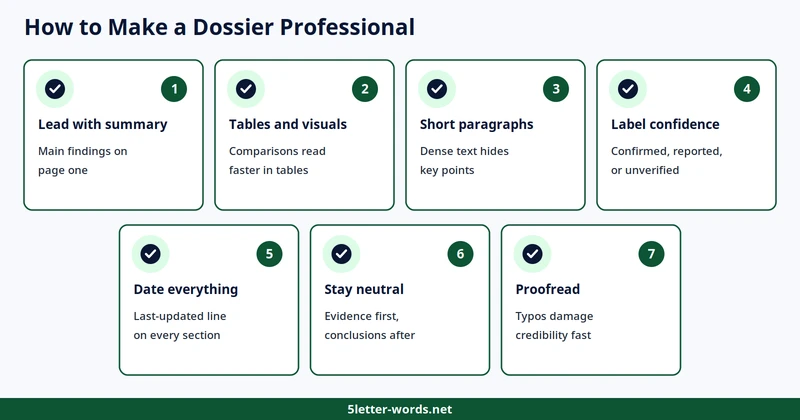
– Lead with a summary, so the main findings sit on page one.
– Use tables and visuals, since comparisons read faster in a table than in prose.
– Keep paragraphs short, since dense text hides key points.
– Label confidence, marking facts as confirmed, reported, or unverified.
– Date everything, adding a last-updated line to every section.
– Stay neutral, presenting evidence first and conclusions separately.
– Proofread the file carefully, since typos damage credibility fast.
How Often to Update a Dossier
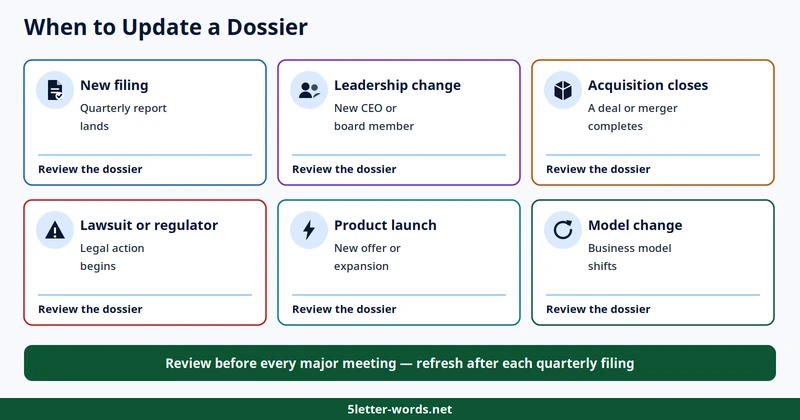
Treat a dossier as a living document, not a one-time report. Review it when a new financial report lands or leadership changes. Review it again when an acquisition closes or a product launches. A lawsuit, a regulator action, a major partnership, or a business-model change also calls for a review. For fast-moving companies, schedule a periodic review even without a trigger event. Always include a last-updated date near the beginning of the file, and store each version where the team can find it. A shared knowledge base keeps dossiers searchable, so a team can reuse past research instead of starting over. Knowledge base software fits this job, since it holds documents, owners, and update dates in one place.
Before You Share: The Dossier Checklist
Use this due diligence checklist before sharing any dossier file. Each item takes a minute to check and saves a costly correction later.
- Confirm the research objective and company identity, with the legal entity matched to a registry record.
- Complete all relevant dossier sections, or mark any skipped section as not needed.
- Add source links for factual claims, so every number, date, and name has an inline citation.
- Verify dates, figures, and citations on the key claims. Log what was checked and when it was checked.
- Identify risks and information gaps in the file first. List red flags and open questions alongside each risk.
- Include a one-page executive summary with findings, risks, and next steps.
- Add the report date, version, and refresh reminder, so readers can tell how fresh the file is.
Conclusion
A research dossier for target company decisions turns scattered facts into a clear, usable story. The work begins with a purpose, follows a fixed structure, relies on trusted sources, and stays current through regular updates. Build the profile, study the market, and review the people behind the numbers. Run a SWOT analysis, then cite every claim in the file. A dossier built that way becomes a reusable business-intelligence resource, not a one-time report, and the decisions it supports get sharper with each use.
Frequently Asked Questions
What is a research dossier?
A dossier is a structured report that gathers and analyzes verified information about one company to support a business decision. The file covers the profile, history, products, market, leaders, finances, competitors, and recent news. Each fact carries a source and a check date, so a dossier turns raw research into a clear picture for teams that must decide.
What should a company dossier include?
Include the profile, history, products, market, competitors, leaders, finances, SWOT, digital presence, and sources. Add an executive summary at the front, a source log at the back, and a list of information gaps. The exact depth follows the decision, while the structure stays the same across dossiers.
How long should a company dossier be?
Most dossiers run from five to twenty pages as a rule of thumb, depending on purpose. A one-page executive summary plus a few pages of sections suits many sales calls, while due diligence can run longer. Length should follow the decision, so cut any section that does not change what the reader will do.
How to research a private company?
Start with the state business registry to confirm the legal name and status. Then review the company website, press releases, job postings, news coverage, and trademark records, since private companies usually do not file with the SEC. Label third-party figures as estimates, and record unavailable information as a research limitation.
Where can I find public company filings for free?
SEC EDGAR offers free public access to millions of filings, with no account or registration needed. Search by company name or ticker, then filter by form type and date to find the right report. The full-text search covers electronic filings submitted since 2001, more than 20 years of disclosures, including 10-K annual reports, 10-Q quarterly reports, and 8-K event reports.
How much does PACER cost?
PACER charges $0.10 per page to view federal court documents, with a $3.00 cap per document. Fees are waived when total charges stay at $30 or less in a quarter, and 75 percent of users pay no fee in a given quarter. Court opinions are always free, and the cap does not apply to transcripts or name searches.
Can AI create a complete company research dossier?
AI can draft most of a company research dossier and collect facts quickly. Deep FinResearch Bench found that agent reports still trailed analysts and held claims that could not be verified from their citations. Plan to check key facts against primary sources and add your own judgment before using the file for a decision.
How often should a research dossier be updated?
Update it before every major meeting or decision, and whenever a big signal appears, such as a funding round, leadership change, or lawsuit. For a live deal, check the news every week and refresh the file after each quarterly filing. Record the date of each update so readers can tell how fresh the file is.
Is “target company” the same as Target Corporation?
The two terms do not mean the same thing. In business research, a target company means the organization under investigation. The target can be a startup, a private company, a public corporation, a supplier, a competitor, or an acquisition candidate, while Target Corporation names one specific retailer.
Can the same template compare companies?
The same structure works for comparison, since every dossier answers the same fixed questions. Build one dossier per company, then compare section by section, such as financials against financials and risks against risks. Differences show up fast when the structure stays the same across companies.
References
1. SEC EDGAR, EDGAR Full Text Search, https://www.sec.gov/edgar/search/
2. PACER, How much does it cost to access documents using PACER?, https://pacer.uscourts.gov/help/faqs/how-much-does-it-cost-access-documents-using-pacer
3. Companies House, Find and update company information, https://find-and-update.company-information.service.gov.uk
4. Haque, M., Papadimitriou, A., Mensah, S., Ma, Z., Guo, Z., Sain, J. P., Kaur, S., Smiley, C., and Liu, X., Deep FinResearch Bench: Evaluating AI’s Ability to Conduct Professional Financial Investment Research, arXiv:2604.21006, April 2026, https://arxiv.org/abs/2604.21006v1
5. Bain and Company, Due Diligence: Evolving Approaches Boost the Odds of Success, 2020 Global Corporate M&A Report, https://www.bain.com/insights/due-diligence-global-ma-report-2020
6. Christensen, C. M., Alton, R., Rising, C., and Waldeck, A., The Big Idea: The New M&A Playbook, Harvard Business Review, March 2011, https://hbr.org/2011/03/the-big-idea-the-new-ma-playbook
7. OpenAI, Introducing deep research, 2 February 2025, https://openai.com/index/introducing-deep-research/
8. Microsoft Corporation, FY2025 Form 10-K and investor relations income statements, https://www.microsoft.com/en-us/investor/earnings/fy-2025-q4/income-statements