

Best Small Business Accounting Software: Top Picks and How to Choose (2026)
The best small business accounting software matches the size of the business, the volume of invoices, and the need for payroll. Price matters too, since a tool that costs more than the time it saves earns no place in a small budget. The guide below compares nine products on price, free plans, payroll, and fit, with every price checked on the vendor’s own pricing page in November 2026.
What Is Small Business Accounting Software?
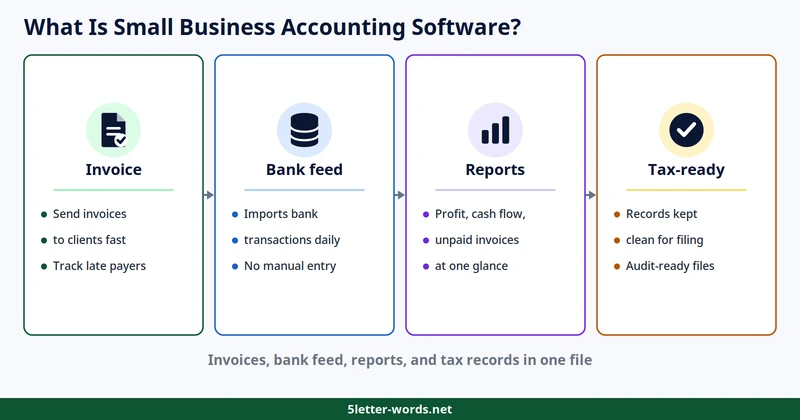
Small business accounting software records income, sends invoices, and tracks bills. The same file reconciles bank accounts and produces reports for tax filing. One file replaces a pile of spreadsheets, receipts, and bank statements. The owner sees cash flow, unpaid invoices, and profit in one place. Most products in this guide run in the cloud, which means the books stay available from any computer and update without installs.
Small businesses dominate the American economy by sheer number. The Small Business Administration counts 36.2 million small businesses in the United States, or 99.9 percent of all businesses, in its 2025 Small Business Profile. A small business generally means fewer than 500 employees. Most of those firms need the same basics: invoices that go out on time, expenses that get recorded, and records that survive a tax audit. A business that sends more than a few invoices a month needs software, while one with almost no sales can wait. The software also tracks who owes money, which invoices are late, and which bills fall due next. The picture helps the owner chase late payers early, before cash runs short.
A spreadsheet records numbers, while accounting software connects the bank feed, the invoice, the tax report, and the payroll in one file. A spreadsheet cannot warn that a client is 60 days late, and it cannot reconcile a bank feed on its own. Small business bookkeeping software earns its price when it saves hours each month and keeps records clean enough for an accountant or an audit. The sections below show which product fits which business, what each one costs, and how to switch without losing data.
Best Picks at a Glance
The table below compares all nine products on the facts that decide a purchase. Each row lists the lowest paid price, the free plan, the trial or promo, and the best fit. Prices come from each vendor’s own pricing page, checked in November 2026, in US dollars.
Product | Lowest paid plan | Free plan | Trial or promo | Best for |
QuickBooks Online | $38 per month | $0 plan | 50% off 3 months | Growing teams that need the widest plan range |
Xero | $27 per month | None | 80% off 3 months | Businesses that want simple monthly billing |
FreshBooks | $23 per month | None | 80% off 4 months | Freelancers and service businesses that send many invoices |
Zoho Books | $15 per month, annual billing | $0 forever | 14-day trial | Small businesses that want a free plan with room to grow |
Wave | $19 per month, Pro | $0 Starter | None listed | Very small businesses that want core accounting free |
Sage 50 Cloud | $132.17 per month | None | 30-day trial | Established businesses that can pay for a higher tier |
Kashoo | $30 per month | None | 50% off 6 months | Small businesses that want one simple flat price |
Patriot | $20 per month | None | 50% off 3 months, plus 30 days free | Small businesses that want low flat pricing with a bookkeeping add-on |
Quicken | $4.49 per month, annual billing | None | None listed | Owners who track business and personal money in one place |
QuickBooks Online leads on plan range, with four paid tiers plus a free plan. Xero and FreshBooks sit in the middle on price, with three tiers each. Zoho Books and Wave offer real free plans, which suits a business with almost no budget. Sage 50 Cloud costs far more than the rest, which puts it out of reach for most small firms. Quicken starts cheapest, yet it comes from personal finance, not business accounting. The best accounting software for small businesses is the one that fits the business, not the one with the longest feature list.
Reviews
The nine reviews below follow the same pattern: best fit, price structure, free plan or trial, and who should skip the product. Prices below come from each vendor’s own pricing page, checked in November 2026.
QuickBooks Online
QuickBooks Online suits growing teams that need the widest plan range. Simple Start costs $38 a month, Essentials $85, Plus $140, and Advanced $340. A free plan costs $0, with one user, two invoices a month, and ten bank transactions a month. New buyers get 50 percent off for three months. The free plan suits a test run, while the paid tiers suit a business with real invoice volume. Skip QuickBooks Online if the business sends only a few invoices a month, since the free plan caps at two. The four tiers suit a business that grows, since each step up adds room without a switch. Watch the promo end date, since the price jumps back to list after three months. The four tiers also suit a business that starts small and adds users later.
Xero
Xero suits businesses that want simple monthly billing and no annual contract. Early costs $27 a month, Growing $59, and Established $97. New buyers get 80 percent off for three months, or one month free instead. Plans bill monthly only, with no annual discount to chase. The three tiers suit a business that wants predictable billing without a free plan. Skip Xero if a free plan matters, since none exists here. The monthly billing suits a business that hates annual contracts and yearly lump sums. Watch the monthly billing, since no annual discount exists to lower the total. The three tiers also suit a business that wants one monthly bill with no surprises.
FreshBooks
FreshBooks suits freelancers and service businesses that send many invoices. Lite costs $23 a month, Plus $43, and Premium $70. New buyers get 80 percent off for four months, or a 30-day trial instead. Annual billing cuts the price further: Lite totals $181.33 a year, Plus $339.01, and Premium $551.88, with the promo included. Accounting software for freelancers needs strong invoicing first, and FreshBooks leads with that strength. Skip FreshBooks if the business needs the cheapest plan, since Lite starts above Wave and Quicken. The annual totals suit a business that pays yearly, since the promo cuts the first year sharply. Watch the promo end date, since the price jumps back to list after four months. The three tiers also suit a business that invoices clients weekly and tracks late payers.
Zoho Books
Zoho Books suits small businesses that want a free plan with room to grow. The free plan costs $0 forever, for one user and one accountant. Standard costs $20 a month, or $15 with annual billing. Professional costs $50, or $40 annual, while Premium costs $70, or $60 annual. Elite costs $120 a month with annual billing, and Ultimate costs $240. A 14-day trial covers the paid tiers, so a team can test before paying. Skip Zoho Books if the business wants a trial longer than two weeks. The six tiers suit a business that grows slowly, since each step up costs little at first. Watch the annual billing, since the monthly price costs more on every tier. The six tiers also suit a business that wants a free start and a slow climb.
Wave
Wave suits very small businesses that want core accounting free. The Starter plan costs $0, with no monthly fee for basic accounting. Pro costs $19 a month, or $190 a year, which saves $38. Payroll costs $20 a month as an add-on, while bookkeeping starts at $149 a month. The free core suits a business with almost no budget, while Pro suits one that needs more room. Skip Wave if the business needs a paid plan with more room, since Pro is the only step up. The payroll add-on suits a small employer that wants pay and books in one place. Watch the add-on costs, since payroll and bookkeeping sit outside the base price. The two tiers also suit a business that wants free core accounting with one paid step up.
Sage 50 Cloud
Sage 50 Cloud suits established businesses that can pay for a higher tier. Pro costs $132.17 a month, or $1,448 a year, for one user. Premium costs $182.50 a month, or $1,947 a year. Quantum costs $271.17 a month, or $2,841 a year. A 30-day trial covers the paid tiers before any payment. The price puts Sage far above the rest, so most small firms should look elsewhere first. Skip Sage 50 Cloud if the budget sits under $100 a month, since Pro alone costs $132.17. The per-user price suits a business with one user, while a team pays far more. Watch the annual total, since the monthly price hides a four-figure yearly bill. The three tiers also suit a business that wants one vendor for the long term.
Kashoo
Kashoo suits small businesses that want one simple flat price. The single plan costs $30 a month, or $324 a year. New buyers get 50 percent off for six months. A 14-day trial covers the plan before any payment. The flat price suits an owner who wants one number, not a tier ladder to climb. Skip Kashoo if the business wants a free plan, since none exists here. The flat price suits an owner who hates tier ladders and promo math. Watch the promo end date, since the price jumps back to list after six months. The single tier also suits a business that wants one price and no upgrade decisions.
Patriot
Patriot suits small businesses that want low flat pricing with a bookkeeping add-on. Basic costs $20 a month, while Premium costs $30. New buyers get 50 percent off for three months with 30 days free. Bookkeeping starts at $100 a month as an add-on. The low price suits a small employer, while the add-on suits one that wants help with the books. The 30 days free suit a business that wants a longer test than a promo alone. The bookkeeping add-on suits an owner who wants help without hiring staff. Watch the add-on price, since bookkeeping starts at $100 a month on top of the plan. The two tiers also suit a business that wants low pricing with help on call.
Quicken
Quicken suits owners who track business and personal money in one place. Classic bills annually only, with four tiers to choose from. Starter costs $4.49 a month, Deluxe $6.99, and Premier $7.99. The Business and Personal tier costs $10.99 a month. List prices run higher for the top two tiers. Premier lists at $8.99 a month before any discount applies. The Business and Personal tier lists at $12.49 a month. The cloud options cost less than the Classic tiers. Simplifi costs $3.99 a month with annual billing included. The Business and Personal cloud plan costs $4.99 a month. The low price suits a sole trader, while the personal-finance roots limit its depth for a growing team. Skip Quicken if the business outgrows personal finance, since the tiers stay close to it. The annual billing suits an owner who pays once a year and forgets the monthly math. Watch the annual billing, since the monthly figure hides a yearly charge. The tiers also suit an owner who wants business and personal money in one file.
Best Free Accounting Software
Free accounting software for small business buyers means a $0 plan with real limits, not a trial. Three products in this guide offer a free plan: QuickBooks Online, Zoho Books, and Wave. Each free plan caps users, invoices, or transactions, so the right choice depends on volume.
The table below compares the three free plans on what each one includes.
Product | Free plan | What is included | What to check |
QuickBooks Online | $0 plan | 1 user; 2 invoices a month; 10 bank transactions a month | The limits fit a test run, not a busy month |
Zoho Books | $0 forever | 1 user and 1 accountant | Confirm the current transaction limits on the vendor’s site |
Wave | $0 Starter | Core accounting with no monthly fee | Confirm the current limits on the vendor’s site |
A free plan suits a business with almost no transactions each month. Once invoices pass the free cap, the cheapest paid tier costs less than the hours lost to workarounds. Check the current limits on the vendor’s site before choosing, since free plans change often. Zoho Books gives the longest free runway, since its $0 plan has no end date. QuickBooks Online gives the tightest free plan, with two invoices a month as the hard cap.
Software vs Bookkeeping Service
Software and a bookkeeping service solve the same problem in different ways. A service sends a person to do the books, while software gives the owner tools to do them. Some lists mix the two, which confuses buyers who compare prices across unlike options.
The table below separates the three options by who does the work and what each one costs.
Option | What you get | Who does the work | Typical cost |
Accounting software | Invoicing, bills, bank reconciliation, reports | The owner or a staff member | $0 to $340 a month |
Bookkeeping service | A bookkeeper who records, reconciles, and reports each month | A remote bookkeeper | Varies by business size; get a quote before deciding |
Software plus service | The software plus a bookkeeper on top | The owner plus a bookkeeper | From $100 a month on top of the software |
A service suits an owner who wants the books done without touching them. Software suits an owner who wants control and a lower monthly price. Wave and Patriot sell bookkeeping as an add-on from $100 a month. A buyer can start with software and add help later. A hybrid suits a business that wants control of daily books with a person checking them. Price the hybrid before committing, since the add-on can double the monthly total.
How to Choose
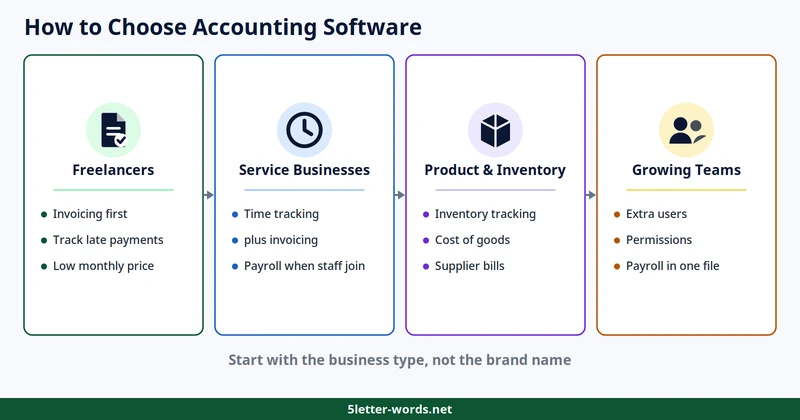
How to choose accounting software starts with the business type, not the brand name. A freelancer needs invoicing first, while a product business needs inventory tracking. A growing team needs extra users, permissions, and payroll. Accounting software vs spreadsheet comes down to volume: a spreadsheet works until invoices, bills, and bank feeds outgrow it. Cloud accounting software suits teams that work from more than one place.
Freelancers
Freelancers live on invoices, so invoicing leads the choice. FreshBooks suits this shape with a low monthly price. Wave suits it too, with core accounting free for the smallest firms. Pick a tool that sends invoices fast, tracks late payments, and handles tax time without a fight. Skip the expensive tiers until client work grows past a few invoices a week. A freelancer with one client needs less than one with ten, so count clients before choosing.
Service Businesses
Service businesses sell hours, so time tracking and invoicing lead the choice. FreshBooks suits this shape with tiered plans that grow with the team. QuickBooks Online suits it too, with four tiers from $38 to $340 a month. Payroll matters once staff join, so check the payroll price before choosing. Accounting software with payroll usually costs extra, either as an add-on or a higher tier. Wave charges $20 a month for its payroll add-on, which shows the extra cost clearly. A service business with staff needs payroll from day one, while a solo operator can add it later.
Product and Inventory Businesses
Product businesses need inventory tracking, cost of goods, and supplier bills. Sage 50 Cloud suits this shape, yet its price puts it out of reach for most small firms. QuickBooks Online Plus suits it too, at $140 a month, with room for inventory as sales grow. Check the inventory limits on each tier before buying, since limits differ by tier. A product business with one channel needs less than one that sells in stores and online.
Growing Teams
Growing teams need extra users, permissions, and payroll in one file. QuickBooks Online suits this shape with four tiers, from $38 to $340 a month. Xero suits it too, with three tiers from $27 to $97 a month. Count the users before choosing, since per-user pricing changes the monthly total fast. KPI examples help here, since the right metrics show whether growth pays for the higher tier. A growing team should pick a tier with room for two more users than it has today.
Accounting Software vs Spreadsheet
A spreadsheet costs nothing, while software costs $0 to $340 a month. The gap is not price, since the free plans cost nothing too. A spreadsheet records numbers, while software connects the bank feed, the invoice, and the tax report.
The table below compares the two on the work that matters most.
Feature | Spreadsheet | Accounting software |
Bank feed | Manual entry | Reconciles the bank feed |
Invoicing | Manual, one file per client | Sends and tracks invoices |
Tax reports | Built by hand | Produced from the books |
Audit trail | Easy to overwrite | Every entry stays logged |
Cost | $0 | $0 to $340 a month |
A spreadsheet suits a business with almost no sales, while software suits one with steady invoices. Move to software when invoices, bills, or bank feeds take more than an hour a week.
What Does Accounting Software Cost?
Accounting software pricing runs from $0 to $340 a month across the nine products in this guide. The table below lists every product with its paid plans and promo. Prices come from each vendor’s own pricing page, checked in November 2026.
Product | Paid plans | Trial or promo |
QuickBooks Online | $38 / $85 / $140 / $340 per month | 50% off 3 months |
Xero | $27 / $59 / $97 per month | 80% off 3 months |
FreshBooks | $23 / $43 / $70 per month | 80% off 4 months |
Zoho Books | $15 to $240 per month, by tier | 14-day trial |
Wave | Pro $19 per month or $190 a year | Free Starter plan |
Sage 50 Cloud | $132.17 / $182.50 / $271.17 per month | 30-day trial |
Kashoo | $30 per month or $324 a year | 50% off 6 months |
Patriot | $20 / $30 per month | 50% off 3 months, plus 30 days free |
Quicken | $4.49 to $10.99 per month, annual billing | None listed |
Best small business accounting software value comes from fit, not the lowest price. Promos cut the first months only, so judge each product on its list price. Annual billing saves more on FreshBooks, Zoho Books, Wave, Kashoo, and Quicken. Check the current price on the vendor’s site before buying, since promos change often. Yearly cost shows the real gap between the cheapest and priciest tiers. The cheapest paid year costs $53.88 on Quicken Starter, $180 on Zoho Standard annual, and $190 on Wave Pro. The priciest year costs $4,080 on QuickBooks Advanced, $2,841 on Sage Quantum annual, and $1,164 on Xero Established. A business that pays yearly should compare these totals, not the monthly prices. Ask which tier pays for itself, not which one costs least. A tier pays for itself when the hours it saves cost more than its monthly price. A business that bills $50 an hour breaks even on a $38 plan in under one hour a month.
What to Check Before You Buy
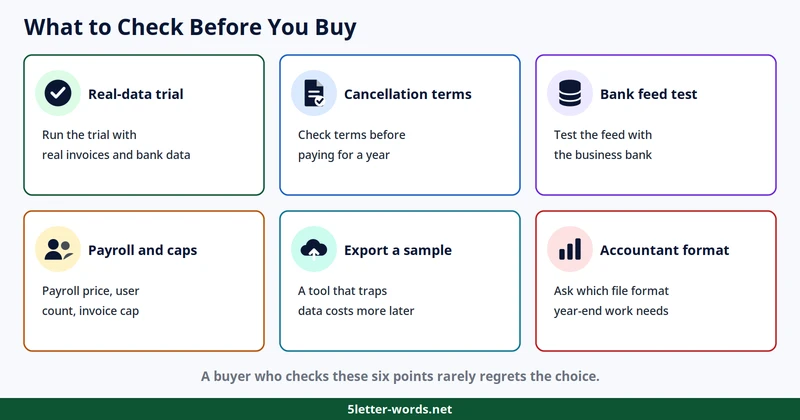
A price table answers cost, while a short checklist answers fit.
- Run the trial first, with real invoices and real bank data, not demo numbers.
- Check the cancellation terms before paying, since a yearly plan locks the money in.
- Test the bank feed with the business bank, since a broken feed wastes hours each month.
- Confirm the payroll price, the user count, and the invoice cap on the tier you pick.
- Export a sample file before committing, since a tool that traps data costs more later.
- Ask the accountant which file format the year-end work needs.
A buyer who checks these six points rarely regrets the choice.
How to Switch Accounting Software
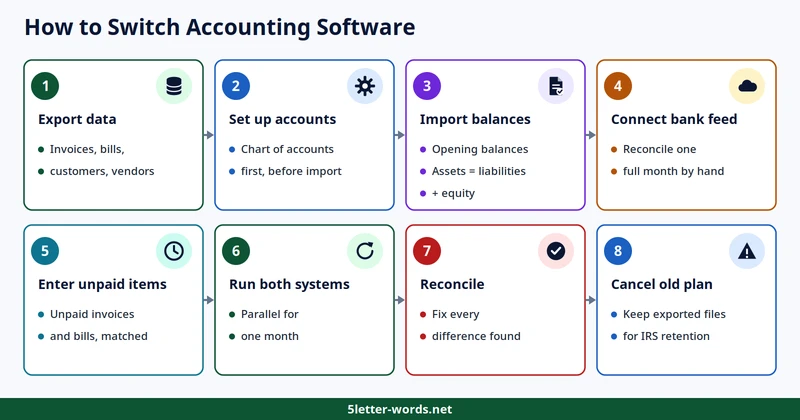
How to switch accounting software without losing data comes down to order: export first, set up second, run both third. Most switches fail from a rushed export, not from the new tool.
- Export all data from the old tool, including invoices, bills, customers, and vendors.
- Pick the new tool and set up the chart of accounts first.
- Import opening balances and check that assets equal liabilities plus equity.
- Connect the bank feed and reconcile one full month by hand.
- Enter unpaid invoices and bills, then match each one to a customer or vendor.
- Run both systems in parallel for one month before cancelling the old one.
- Reconcile the new books against the old ones, then fix every difference.
- Cancel the old subscription and keep the exported files for the IRS retention period.
Keep the exported files safe, since the IRS asks for records years after the switch. Store procedures and records where the team can find them, since a knowledge base keeps both in one place. A switch takes a weekend for a small file, and a week for a large one. Plan the switch for a quiet week, not the week tax returns fall due. Tell the accountant before switching, since the year-end file format may change.
Do You Still Need an Accountant?
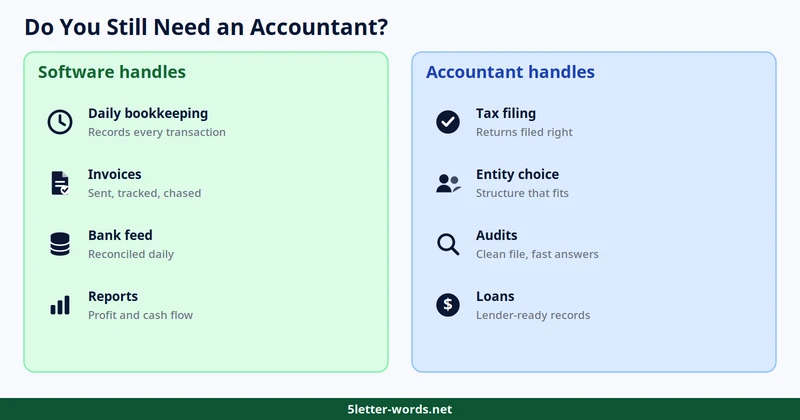
Software handles daily bookkeeping, while an accountant handles tax filing, entity choice, and audits. A business with simple books can run on software alone for most of the year. An accountant earns the fee when tax law, a loan, an audit, or a sale enters the picture. Keep records until the IRS period of limitations runs out, since the agency can ask for them years later.
The IRS sets the limits for each record type. Keep general records for 3 years, employment tax records for 4 years, and bad-debt claims for 7 years. Keep records for 6 years if income is underreported by more than 25 percent. Keep records indefinitely if no return was filed or the return was fraudulent. Keep invoices, receipts, and bank statements in digital form, since paper fades over time. A clean file also speeds up a loan application, since lenders ask for the same records. The best small business accounting software still leaves tax filing to a person.
Conclusion
Best small business accounting software for a business is the one that fits its size, its invoice volume, and its need for payroll. Start with the free plans, compare the paid tiers on list price, and switch only after a parallel month. A tool that fits today and grows with the business beats a cheaper one that breaks under volume. Check prices again before buying, since promos and tiers change through the year.
Frequently Asked Questions
What is the best accounting software for a small business?
The best choice fits the size of the business, the volume of invoices, and the need for payroll. A freelancer suits a free plan or the cheapest tier, while a growing team suits a mid-tier plan with room for users. Compare list prices first, since promos cut only the first months.
Is there really free accounting software for a small business?
Three products offer a $0 plan: QuickBooks Online, Zoho Books, and Wave. Each free plan caps users, invoices, or transactions, so a business with real volume outgrows it fast. Start free, then move to the cheapest paid tier when invoices pass the cap.
How much does small business accounting software cost?
Paid plans run from $4.49 to $340 a month across the nine products in this guide. Most small businesses land between $20 and $100 a month, before payroll add-ons. Judge each product on its list price, since promos cut only the first months.
Can I do my own bookkeeping without an accountant?
A business with simple books can run on software alone for most of the year. An accountant still earns the fee for tax filing, entity choice, and audits. Keep records for the IRS retention period even when the books look simple.
How do I switch accounting software without losing data?
Export all data first, set up the new chart of accounts, and import opening balances. Run both systems in parallel for one month, then reconcile before cancelling the old one. Keep the exported files for the IRS retention period, since the agency can ask for them years later.
Does accounting software handle payroll and taxes?
Most products handle payroll as an add-on or a higher tier, not in the base plan. Wave charges $20 a month for its payroll add-on, so check the payroll price before choosing. Tax reports come from the books, while tax filing still needs a person or an accountant.
Is cloud accounting software safe?
Cloud products store the books on the vendor’s servers, with logins and encryption in place. The risk is a lost login or a missed backup, so use strong passwords and check the vendor’s backup policy. A cloud file also survives a stolen laptop, which a local spreadsheet cannot promise.
What is the difference between accounting software and a bookkeeping service?
Software gives the owner tools to do the books, while a service sends a person to do them. Software costs $0 to $340 a month, while a service costs from $100 a month as an add-on. Start with software, then add a bookkeeper when the books outgrow the owner’s time.
References
1. Small Business Administration, 2025 Small Business Profile, United States, June 2025, https://advocacy.sba.gov/wp-content/uploads/2025/06/United_States_2025-State-Profile.pdf
2. Internal Revenue Service, How long should I keep records?, https://www.irs.gov/businesses/small-businesses-self-employed/how-long-should-i-keep-records
3. Vendor pricing pages, checked November 2026: QuickBooks Online, Xero, FreshBooks, Zoho Books, Wave, Sage 50 Cloud, Kashoo, Patriot, Quicken